
Technology · Exhibit 44-C · Sinclair ZX80 · 1980
Under the £100 barrier.
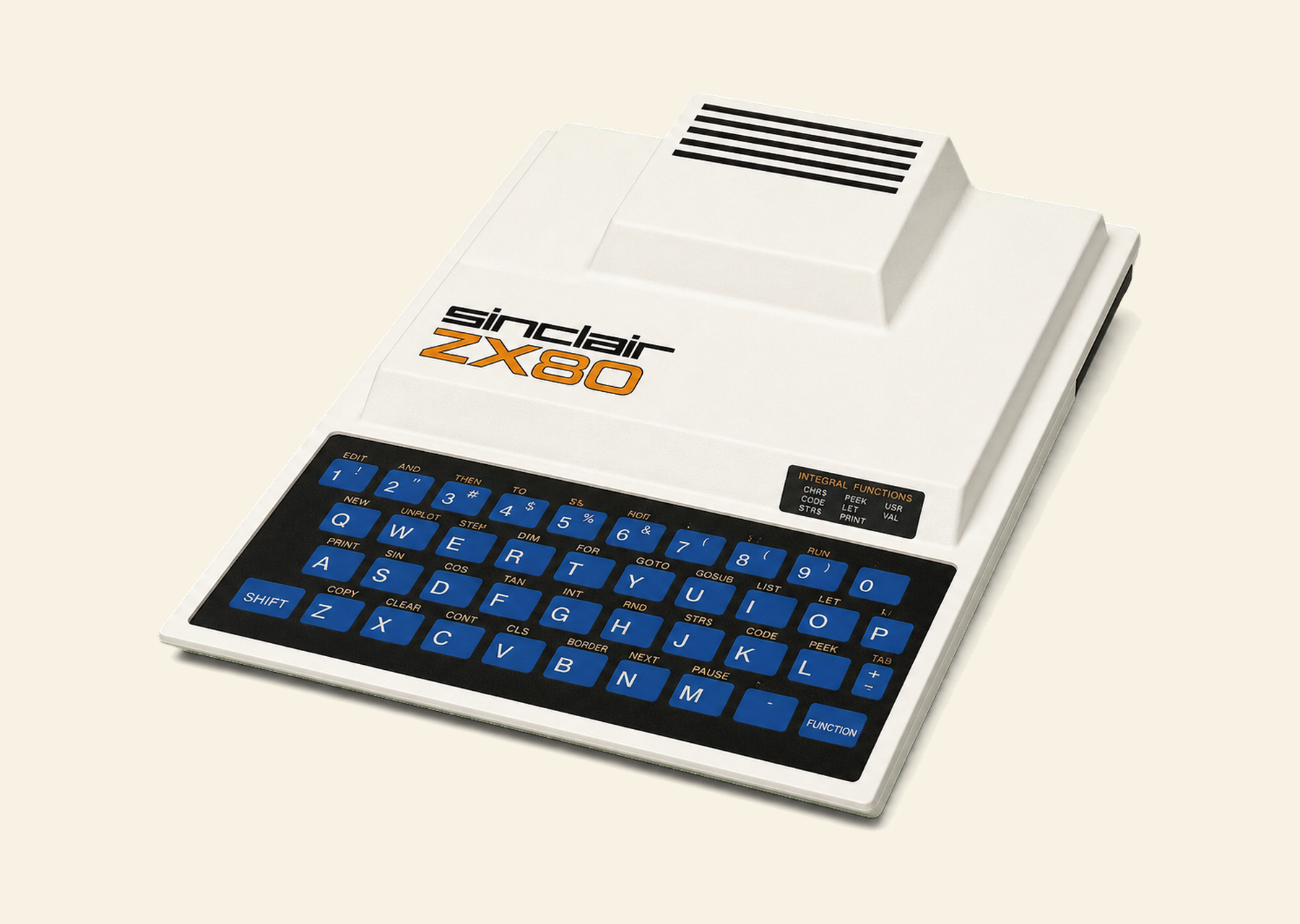
The Sinclair ZX80 packs a lot of punch in a small space, continuing the tradition of minaturisation by Clive Sinclair, it's also very pretty - the casing even has go-faster stripes!
10 PRINT "ZX80"
20 GOTO 10
RUN- Filed under
- Technology · Micros
- Reference
- REF 44-080
- Claim to fame
- First ready-built computer under £100
- Curated by
- Seamus Waldron
Hardware
A sealed keyboard, a serial screen and one busy CPU
The keyboard is most interesting; it's one of those waterproof, chemical proof, completely sealed units and it's stuck on the main PCB. Made of a special tough plastic, the under-surface is printed with the key symbols so as to eliminate any rubbing off. Between this keyplate and the PCB containing the metal contact strips (about five per key) is a piece ofsticky plastic containing forty holes which line up with the "keys". This material is about .006" thick and is just sufficient to keep the metal underside of the keyplate away from the contacts, except when touched of course.
Typing gives a sensation of drumming your fingers rather than of doing anything useful. This is a totally mistaken inpression because it really works rather well. For those who are interested, I found that a "wiping" action was more successful than the tapping movement useually associated with typing. Typists may be pleased to hear that the keys are in standard QWERTY layout although somewhat compressed compared to, say, the office IBM.
Inside the machine
Looking inside the machine, I find that it's controlled by a NEC 780-1 processor chip...a copy of the well known and very successfull Z80. This CPU, running at 3.5 MHz, does all the work for the ZX80, including driving the TV and the cassette recorder. You'll notice that if any work is taking place, be it calculation, accepting input from the keyboard or driving the cassette recorder, then the TV picture disappears - only to return when the activity is complete. This can be irritating to observers (at a demonstration for example) but I found it positively beneficial when keying in programs because it gave me positive feedback whenever a key made successful contact.
The BASIC interpreter, operating system, character set and editor are all held in a 4K byte ROM. If you are feeling adventerous ther's no reason why you should't pop your own ROM (TMS 2532) in its place.
Memory in the basic system comprises 1K statis RAM; you can add to it via the expansion port, giving a maximum potential of 16K. The memory expands with the aid of plug in modules, each designed to carry up to 3k in 1k increments. This five modules would be required to give the 16K maximum. At switch-on the machine does a memory check which also tells the system how much memory is online. Should you reconfigure the memory, then the command NEW will execute the memory check cycle again.
The "outside world"
Moving on to the "outside world" connections, there's a cassette interface, TV socket and a hefty edge connector. The cassette interface comprises two 3.5mm jack plug sockets, securely mounted on the main (an only) PCB. One connects to the "ear" socket on the cassette recorder and the other to the "mic" socket. There is no facility for remote control of the cassette motor. Anyonewith DIN sockets will have to buy a jack plug to DIN connector lead.
Although I encountered one or two problems at first, once working, the cassette interfae proved trouble free. My particular recorder had a nasty habit of recording noises when the CPU was "sending out" silence. This caused the system to get its knickers in a twist when reading from the cassette because it expected silence just before the file header record. After a couple of hours (what a confession) the culprit was found - the "ear" lead, which acts as a monitor while recording, was setting up some sort of oscillation. Answer - simple - disconnect the "ear" jack when recording. Another tip which ensures trouble free loading is to move the tape into the silent section before issuing your LOAD instruction. Rumour has it that the cassette operates at around 250 baud - I believe it, although it doesn't seem terribly important when you're only loading the 1K that I was.
The television connector is simplicity itself. Plug one end of the cable (supplied) into the ZX80 and the other into the television aerial socket, tune to channel 36 and you're in business. The display is magic; rock steady and very clear although reversed characters(white on black) are not so good.
I have already mentioned the business of the display switching off every time the processor needs to do something else. If this drives you mad then you'll have to forfeit some of the undoubted pleasures that this machine has to offer. The screen is not memory mapped; it's treated like a serial file - like a printer in fact - which means that fast moving graphics are out of the question. No doubt some clever Dick out there will take up the challenge and fudge the system, just to prove me wrong. More about the reason for this is the Software section, but anyone who is hooked on white characters on a bloack background can suitably modify the PCB, though why they should want to I'll never know. It's a matter of cutting one track and making a small bridge to another.
Amrican Television (525 line) users are catered for as well; all they need to do is solder in one diode and the system is converted from 50 to 60Hz standards. Do you take your computer camping with you? You'll be pleased to hear it can run from a car battery, provided that the leadregulates the supply. I believe you can buy a cigarette lighter plug with the built in regulator...couple that with a portable TV and a battery powered cassette recorder you'll be the envy of the campsite.
Now let's look at the hefty edge connector. This is where the memory expansion modules fit in, each one being "piggy backed" on the one previous. Thus there are always 44 contacts available for outside use. There are 37 lines drawn from the CPU ple 3 power lines (at 0, 5V and pV); the other lines comprise two eartchs, a "clock" signal and an "external memory in use" indicator.
All in all, the Sinclair ZX80 is a well designed, well produced personal computer. Memory addition comas a bit expensive at £300 for the full expansion, but Clive Sinclair tells me bigger RAMs are on the way - that means cheaper expansion when they appear. If you like soldering and are good at it, it'll probably take you an evening to assemble the kit; if you're at all aprehensive then I suggest that you stump up the extra cost and save yourself twenty pounds worth of heartache aby purchasing the ready built ZX80.
Software
One-key entry and syntax checking that will not let you fail
The software of the ZX80 comprises the BASIC interpreter, the Editor and whatever it is that does the rest of the work (Operating System seems too grand a title).
Program entry
For two reasons, the keying in of programs is an absolute joy! First you don't have to type in many of the BASIC instruction codes, one key is sufficient; second you cannot enter anything that is syntactically incorrect. Some BASIC instructions have to be entered the long way (these are listed above the keyboard) but 29 of the instructions may be entered with a single key stroke, while only 8 need to be keyed in full.
As with many micros most of the instruction codes are stored in a single byte. Normal Z80 machine code can be entered using the POKE statement and executed with the USR instructi on. This should keep the buffs happy after they have tired of BASIC. Syntac checking is superb - it's impossible to go wrong. Every character is checked on entry and, it the interpretor thinks that you are going to make a mistake, it signals with a reverse S (for Syntax) a t the point it thinks you have gone wrong. If, later in the same line you correct the error, then the marker disappears. What a grown up facility for such a small machine! Incidentally, the program lines are displayed very clearly with line numbers, instructions, operators and what have you being nicely spaced out.
Code storage
Inside the machine, the lines of code are held as compactly as possible with most of the commands and operators occupying one byte each. The spaces are removed and there are very few extra bytes needed - for instance the new line code is one byte, although I did notice the "=" operator needed one extra for some reason. I'm sure there are others, but I'm equally sure they are very few and far between. An example of the storage requirement is as follows:
10 FOR A=16424 TO 17424     18 Bytes
20 PRINT PEEK(A);           12 Bytes
30 NEXT A                    5 Bytes
40 STOP                      4 Bytes
So you see, the storage for that program (displaying the 1K memory) is 39 bytes long - an average of 10 bytes per instruction. I'll leave you to work out what sort of program you can get in 1K. Perhaps I should mention that the screen buffer uses part of the 1K, as does the stack and system control area. The stack is held at the top of memory and "grows" down; I put 327 entries on it before it stopped accepting them.
The program and variables "grow" up the into the screen buffer thus reducing the amount of data on display. Eventually it's possible for the porgram or variables to grow so large that there's nothing left on display. It was while experimenting with this interesting feature that I crashed the system. It seems the software couln't cope with someone entering a string 868 bytes long! After about 424 bytes of input the screen removed another character every time I keyed in a new one - it was most odd to watch.
Another way of crashing the system, in fact the only other way I could find, is to hit the EDIT key while in the middle of an INPUT loop. This returns the current program line with a syntax error which is impossible to clear. For those who are feeling unhappy about all this talk of crashing systems, don't worry, it's not as bad as it sounds. In the first place you have to enter forty characters after the screen has gone blank, and in the second place you can only hit EDIT when you are holding the SHIFT key down.
Basic
The language of the ZX80
The ZX80 BASIC has been well thought-out and, while it lacks some of the elegance and sophistication of the bigger machines, it's a very usable version of the language.
The main limitations relate to file handling and matematical functions. File handling facilities don't exist, except by SAVEing the whole memory (which is probably not as daft as it sounds).
For the full vocabulary the ZX81 inherited and extended, see the ZX81 exhibit.
The link archive
The ZX80 web, as it stood in 2003
These were the ZX80 sites worth visiting when this mini-site was built. Most are long gone from the live web, so every link goes to the Internet Archive's copy, nearest to 2003.
- Planet SinclairMicrosite giving background information, pictures and buying info.
- Obsolete Technology WebsiteGeneral ZX80 information, alongside many old computers from the 1970's and 1980's.
- ZX80 Hardware pageHow to build your own ZX80/ZX81. This page details the construction of your own ZX80.
- A Course in BASIC ProgrammingThe ZX80 operating manual and a course in BASIC programming. A work in progress, but pretty good.
- XTenderXTender and XTender2 are ZX81 emulators for MS/DOS (Windows compatible).
- Wikipedia on the ZX80Still live, and still the quickest overview.
- History of Home and Game ComputersOne page history of the ZX80 with background of Sinclair Research and Sir Clive.